TL;DR
- Deploy your code to production gradually across regions/servers, not all at once to reduce blast radius.
- There is a tradeoff between speed and safety in deploying code to every production server all at once vs. one at a time. Take a middle-ground approach that increases deployment velocity as previous deployments show promising results.
Blast Radius
“What is the blast radius?”. It’s a common questions asked in architectural reviews and before a change is deployed to production. But what does it mean? It refers to the magnitude of the impact that a change can have on a system.
For example, if deploying a bad change will bring all of your production servers down at once, you have a high blast radius. If it only causes a single server to fail before halting the rollout, you have a much smaller blast radius. You should seek to reduce this as much as possible to increase your developer velocity while keeping your customers safe.
What You Should Consider
When you’re deploying a code/config change to production, you can either rollout everywhere at once or one server at a time. Deploying everywhere at once means a bad release hits all your users in all your servers/regions at the same time. Your blast radius is your entire fleet. Deploying serially is safer but wastes time, especially when deployments to different machines/regions don’t have any dependency on one another.
There is a middle path: deploy to your smallest server/region first and gradually increase the parallelism as you gain confidence in the deployment that continues to pass tests and maintain metrics above set thresholds.
Whether your deployment is regionalized in the cloud (i.e. us-east, us-west, etc.) or just involves multiple servers, you can design your CI/CD pipeline in such as way where you first deploy to a single region/server. For regions, I recommend selecting one that serves the least traffic on your system. Once tests run in that region and enough data is collected, you can proceed to subsequent deployment jobs that roll out to more regions/servers.
Sample Configuration
A sample project I setup using GitHub Actions has the following flow:
Phase 1: Deploy to region-1, run integration tests and ensure that they pass before proceeding past this stage.
Phase 2: Deploy to both region-2 and region-3 in parallel, run integration tests and ensure they each pass independently before proceeding past this stage.
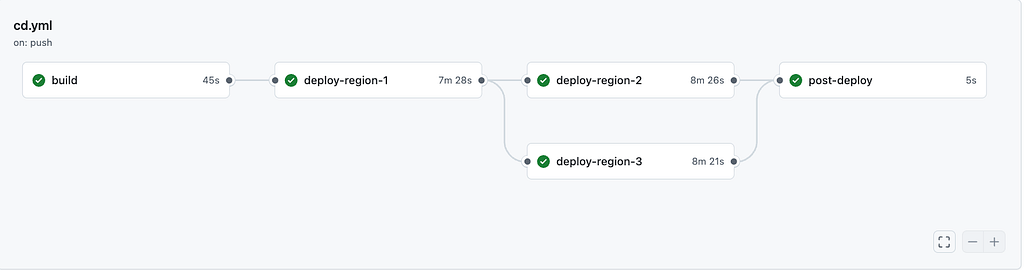
Region 1 is the canary. It gets the new version first. After the rollout completes and integration tests pass against region 1, regions 2 and 3 deploy simultaneously. If anything fails in region 1, regions 2 and 3 are never touched.
The blast radius of a bad release is capped at the traffic that goes to region-1. If all regions handled the same amount of traffic, this would be 33% of our traffic. However, it could be less if it is a smaller region than the others (i.e. fewer customers or less traffic in that region compared to the others).
The CI/CD config with GitHub Actions utilizes job dependencies to enforce the deployment order:
deploy-region-1:
  needs: build
deploy-region-2:
  needs: deploy-region-1 # waits for region-1 (including tests)
deploy-region-3:
  needs: deploy-region-1 # parallel with region-2
post-deploy:
  needs: [deploy-region-2, deploy-region-3] # fan-in: waits for both
The needskeyword does the heavy lifting. deploy-region-2and deploy-region-3 depend on deploy-region-1 so they won’t start until region 1 succeeds.
Each deploy-region-<#> job also performs the integration tests inside of it to ensure the tests don’t break. I would also recommend utilizing progressive deployments within each region (see my previous article on Argo Rollouts).
Takeaway
The changes described here are straightforward and mainly involve configuration. Don’t wait until a large-scale incident happens in produciton before you implement controls to reduce your blast radius.